Supercharging Other EVs
Many Supercharging stalls will be accessible to other electric vehicle drivers in North America through the Tesla app and adapters provided by your vehicle manufacturer. New vehicles outside of Tesla have started coming equipped with NACS charge ports. Vehicles that are NACS-equipped do not require an adapter.
It’s always been our ambition to open the Supercharger network to all EVs, and by doing so, encourage more drivers to rapidly transition to an emission-free future.
Frequently Asked Questions
-
There are three types of Tesla Superchargers:
- Tesla-only Superchargers, which only work for Tesla vehicles.
- All EVs Superchargers, which are available for all EVs to charge with a “Magic Dock” adapter that is provided at the charging post.
- NACS Superchargers, which will become available gradually, by vehicle manufacturer, and can be accessed through an adapter. The adapter has to be provided by your vehicle manufacturer. For new vehicles that are NACS-equipped, no adapter will be necessary.
The following vehicle manufacturers have access to NACS Superchargers:
- Acura
- Audi
- BMW
- Ford
- General Motors (GM)
- Genesis
- Honda
- Hyundai
- JLR
- Kia
- Lucid
- Mercedes-Benz
- Nissan
- Polestar
- Porsche
- Rivian
- Stellantis
- Subaru
- Toyota
- Volkswagen (VW)
- Volvo
To see which sites are compatible to charge your vehicle, add your vehicle details to the Tesla app or use our interactive map.
-
If you own a Tesla vehicle, you can see the nearest Supercharger and real-time availability in the Tesla app by tapping ‘Location’ then the charging icon. If you own an EV made by another manufacturer, you can see available Superchargers by opening the Tesla app and tapping ‘Find a Charger’ or by using our interactive map.
-
Charging speeds vary by Supercharger and vehicle. You can see the max charging speeds of each Supercharger in the Tesla app.
-
The North American Charging System (NACS) is the most common electric vehicle charging standard in North America.
-
Yes. "NACS" is the common name for the "NACS J3400" standard published and maintained by the Society of Automotive Engineers (SAE), a standards organization. NACS was originally developed by Tesla, deployed in 2012 with the first Supercharger and Model S vehicle and eventually published by Tesla in 2022 with the goal of industry-wide adoption. Tesla worked with industry and technical experts through SAE to publish NACS as J3400.
-
Superchargers are accessible to other electric vehicle drivers through the Tesla app, or directly through your EV navigation screen if you opt in. If you choose to opt in, your maps provider will share trip and usage data including:
- ETA to the Supercharger
- Supercharger ID
- When your vehicle arrives at the Supercharger or navigation ends
When available, additional data shared also includes:
- When your vehicle plugs into or out of the Supercharger
- When the vehicle leaves the station
- Recommended charging time
- Vehicle make and model
Tesla will use your trip and usage data to improve wait time and charger availability predictions. You can adjust your data sharing preferences at any time from your vehicle’s navigation settings.
-
- Download the Tesla app (version 4.30.5 or later) for iOS or Android and create a Tesla Account.
- Select ‘Charge Your EV’ and find your Supercharger site.
- Tap the ‘Add Your Vehicle Details’ banner and add your details.
- Add your payment method and follow the prompts.
When you are finished, select ‘Stop Charging’ to complete your session.
Note: If you also own a Tesla vehicle, open the Tesla app and tap the menu in the top-right to find ‘Charge Your Other EV.’
-
Each Supercharger post has a label with a unique identifier at its base. If you are taking the cable from post 4A, simply select post 4A in the Tesla app to begin charging. If you don’t remove the connector within 30 seconds and plug in within one minute of selecting a post, you’ll need to start over.
-
Yes. You can view Supercharger site availability information in the Tesla app.
-
You can pay at any Supercharger using the Tesla app by adding a payment method to your Tesla Account. At a limited number of sites, you can pay directly at the Supercharger using a major credit card, a mobile payment service or text-to-pay.
To make a payment at the Supercharging post with a credit card, follow the Supercharging steps, plug in your vehicle and tap your credit card on the payment terminal.
Your vehicle will begin charging once your credit card payment is accepted.
To make a Supercharging payment with text-to-pay, text “Pay” to 48717 and follow the prompts.
If you do not own a Tesla vehicle, a temporary authorization hold will be placed on your payment method when a charging session starts from the Tesla app. Once charging is complete, make sure to complete the payment for your charging session. Depending on the financial institution’s policies, a payment authorization hold may take a few days to be released.
Note: Supercharging credits can only be used as a payment method for charging sessions of Tesla vehicles at Superchargers sites owned by Tesla.
-
Superchargers are pay-per-use. You can see pricing for each Supercharger site in the Tesla app. When your charging session is complete, an estimate of the final charges is shown on the screen.
Pricing charged by third parties through their apps may vary. Tesla only determines the pricing shown and charged through the Tesla app. All prices shown in the Tesla app for charging your vehicle include normal taxes and fees. Your choices during and after the charging session may incur additional fees such as congestion fees.
Prices may change from time to time.
Charging rate is determined by the plug-in time and does not adjust if pricing changes during the charging session. Certain Supercharger stations offer on-peak and off-peak rates.
-
No. Our Superchargers that are accessible to other EV drivers do not require a membership. Supercharging Memberships are available for EV owners using the Tesla app to lower the cost of charging across the network.
-
A Supercharging Membership allows EV owners to Supercharge at the same price as Tesla vehicle owners when using the Tesla app. You do not need a Supercharging Membership for your Tesla vehicle. However, if you own a Tesla vehicle and an EV made by another manufacturer, you will need a Supercharging Membership to Supercharge your other EV at the Tesla vehicle price.
Note: You do not need to purchase a membership for each vehicle.
To sign up for a Supercharging Membership in the Tesla app, follow these steps.
- Open the Tesla app.
- Tap the menu in the top-right corner.
- Tap ‘Charging.’
- Tap ‘Membership.’
- Tap ‘Join Now.’
Once you sign up for a Supercharging Membership, a monthly membership fee will be charged to your designated Supercharging payment method. Tesla vehicle pricing will then be applied to all your Supercharging sessions when using the Tesla app at select sites.
The monthly membership fee is non-refundable, and you are able to cancel your Supercharging Membership at any time.
To cancel a Supercharging Membership, follow these steps:
- Open the Tesla app.
- Tap the menu in the top-right corner.
- Tap your name.
- Tap ‘Charging.’
- Tap ‘Membership.’
- Tap the ‘Cancel’ button.
-
Yes. The same Supercharging logic and fee structure applies to all EVs when using the Tesla app to help ensure stalls are open for everyone to charge.
If you are using the Tesla app, turn on push notifications to receive a notification when congestion fees may apply during your Supercharging session.
-
Receipts from your touchless payment Supercharging sessions will be available on our website. Enter the charger name, date and payment information to find and view Supercharging receipts.
-
Supercharging is only accessible for NACS-equipped vehicles and CCS1-equipped vehicles with an NACS DC adapter provided by Tesla or your vehicle’s manufacturer. For safety reasons, using third-party adapters is prohibited. Using an AC adapter may result in damage to your vehicle. Refer to our Terms of Use for details on supported adapters.
-
To use an NACS DC adapter while Supercharging, you will need to connect the adapter to the charging cable. To do this, follow the Supercharging steps and connect the adapter before plugging in your vehicle.
To end your charging session, tap ‘Stop Charging’ in the Tesla app. Press the button on top of the adapter to unlatch, then disconnect the adapter using the switch below the charging cable.
-
To use a Magic Dock adapter while Supercharging, you will need to unlock the adapter. To do this, follow the Supercharging steps and unlock the adapter before plugging in your vehicle.
-
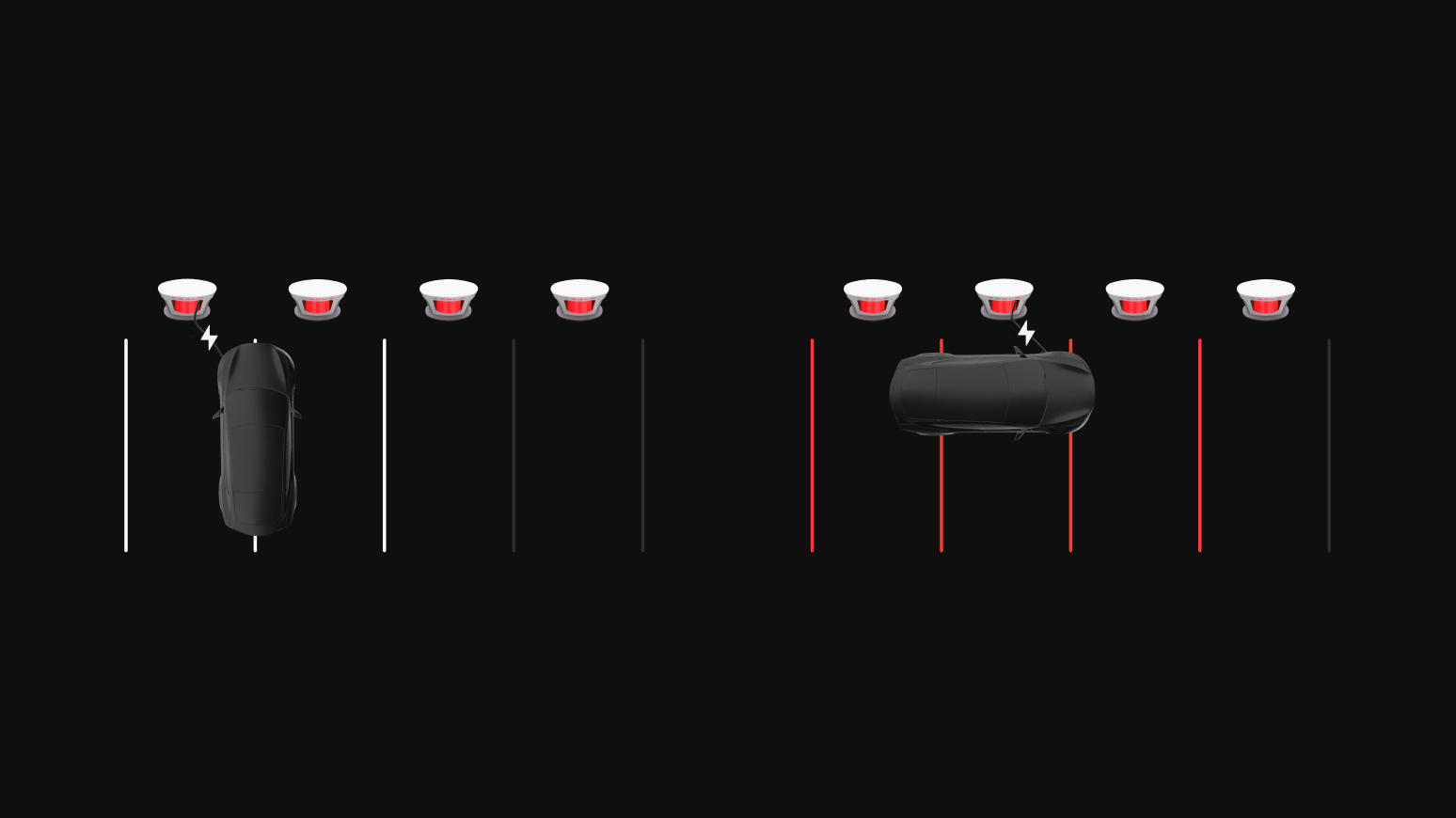
Most Supercharger cables at NACS Supercharger sites should be able to reach your EV charge port, however, in some cases you might have to park over the line in order to charge comfortably. Avoid parking diagonally to reach the cable and try to obstruct as few charge posts as possible. Charge port locations vary by EV model, which requires cable sharing between adjacent stalls at many sites. Tesla is rapidly deploying our latest V4 Supercharger post which reaches all EVs in the same Supercharger stall. Additionally, we encourage all vehicle manufacturers to standardize charge port locations to the rear driver side or front passenger side.